
We present Westworld Finance Diligence Bench, a benchmark of 88 problems that evaluates AI agents on a complete company acquisition due-diligence process. It draws on anonymized data from real private transactions, runs inside dynamic desktop environments, and spans trajectories that reach hundreds of steps. Every problem is written and reviewed by practicing finance deal professionals and verified by a mixed pipeline of agentic, discrete, and binary verifiers.
We evaluate a range of frontier models, each across its native harness and our internal Halluminate harness, and present every model-harness pair three ways.
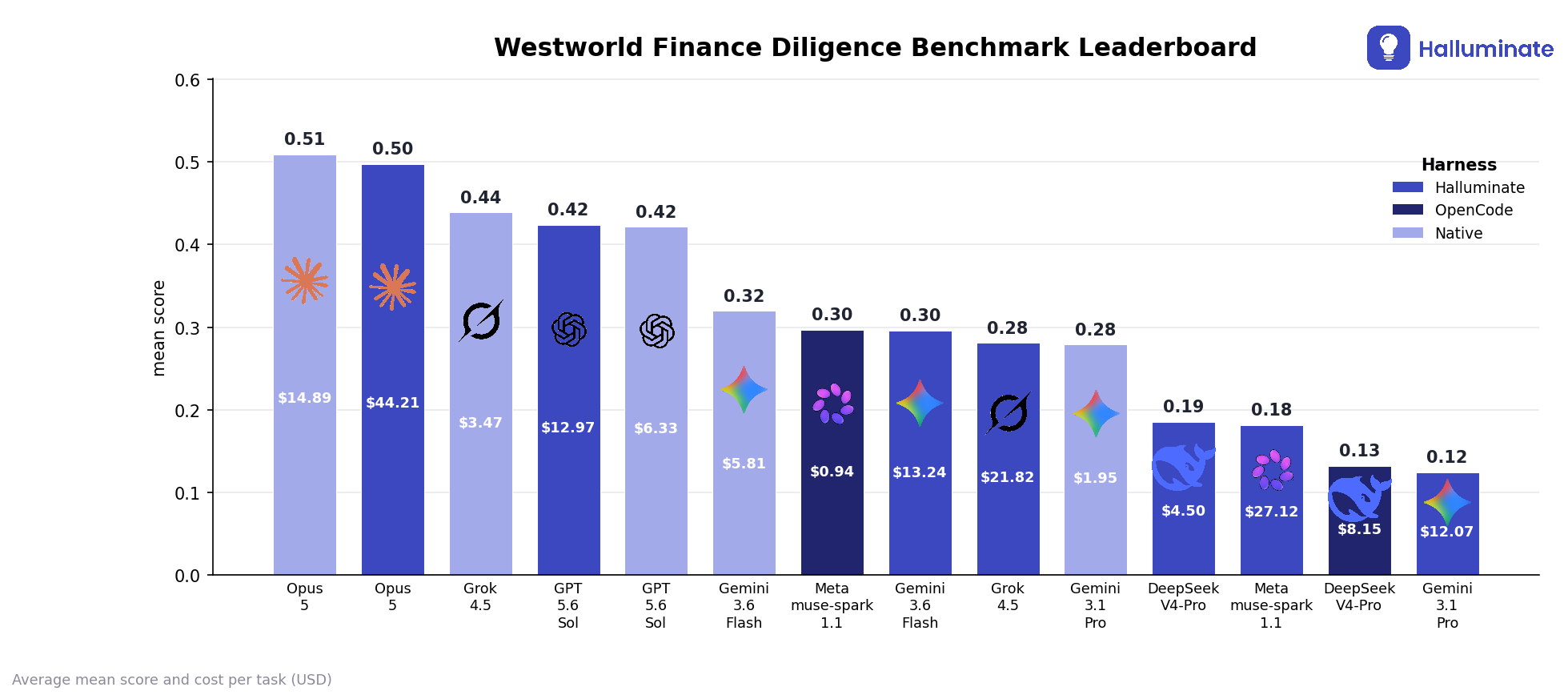
The histogram shows each configuration's mean score with average cost per run inside the bar. The Pareto 2D plot trades that cost against mean score and the summary table adds average tool usage, cost, mean score, and pass rate. Mean score is the per-problem pass@1 verifier grade averaged over the 88 problems, always between 0 and 1. Pass rate is the share of those problems whose single graded run clears the 0.50 bar, meaning it scores at least 0.50; the 0.50 threshold is a reporting choice and does not make the underlying reward binary, as we explain below. Cost is estimated from each run's token usage and the model's published input/output/cached pricing, amortized across the 88 tasks.
Key Innovations of our Benchmark
- 1Real private-deal data: anonymized documents from actual private equity transactions. To the best of our knowledge, no published benchmark evaluates a complete diligence process on private deal data of this breadth.
- 2A complete process: tasks that together span one deal's diligence, from early analysis through to close, rather than isolated tasks tied to a single job title.
- 3Mixed verifier pipeline: each problem is scored by a decomposed mix of agentic rubric grading and deterministic checks, weighted by expert authors and audited in an independent QA pass.
- 4Computer use and tool use together: a single task requires operating a real desktop environment, with files, office applications, and a data room, while also calling structured tools for email and chat, all in one trajectory. A few benchmarks combine these two modes, but it remains rare, and rarer still on finance work.
The rest of this post walks through the benchmark in detail. We first place the benchmark in the context of related work. Then, walk through a sample of a single task, following it from the prompt through the tools, verifiers, and graders. We then describe the quality process we use to keep environments healthy. Next, we present detailed results from our runs, including a per-trajectory error analysis. We close with our takeaways and future work.
1. Previous Works
Benchmarks for professional domains have grown narrow by construction: accounting tasks in one suite, investment banking tasks in another, each targeted at a single task type or a single job title. For instance, some of these are:
- FinanceBench - 10,231 open-book question-answer pairs about public companies, testing whether a model can pull the right figure from a filing.
- FinQA - expert-written numerical-reasoning questions over single earnings reports, each paired with an executable reasoning program.
- ConvFinQA - a conversational extension of FinQA that chains multi-step numerical questions across the turns of a dialogue.
- BizBench - eight quantitative-reasoning tasks that grade financial problem solving through program synthesis over structured data.
- FinanceQA - hedge-fund, private-equity, and investment-banking analysis questions covering hand-spreading, valuation conventions, and reasoning under incomplete information.
However, this decomposition no longer matches how AI systems enter these domains. Organizations now deploy agents against whole processes. This complete-process way of using AI has no frontier-quality benchmark, only piecewise tests that cannot be combined into a full picture. Some works that have attempted to address this are:
- DealTrace - our own private-equity deal review across ten real deals and five sequential stages (extract, reconcile, forecast, market, recommend); a first step toward process-level evaluation, but narrower than a full diligence suite.
- Finance Agent Benchmark - 537 expert questions across nine categories answered by an agent with web-search and EDGAR access; agentic, but still discrete research questions over public filings rather than one connected deal.
- TheAgentCompany - long-horizon agent tasks inside a simulated software company that combine computer use (a real browser and desktop applications) with tool use (code execution, chat, and internal services) in the same task; the closest general analogue to whole-process work precisely because it exercises both modes together, though with almost no finance content.
- OSWorld - 369 open-ended computer-use tasks across real operating systems and applications, establishing the stateful multi-app desktop setting but without any deal or finance domain.
- tau-bench - multi-turn tool-agent-user interactions graded against database state and policy rules, testing sustained tool use, but on customer support rather than analyst deal work.
Westworld Finance Diligence Bench targets this gap, simulating the full body of work that a team of investment bankers, consultants, and accountants would produce together over several weeks. Unlike pure computer-use benchmarks such as OSWorld, our agents operate in the environment through code, structured tools, and mouse-driven GUI control. Trajectories regularly run to hundreds of steps, and the longest model and harness pairings average close to nine hundred iterations per run, as the trajectory analysis below shows.
2. Coverage
The benchmark spans the full arc of a deal, from the first model to the signed close.
Problems are organized into the seven task categories shown above. They are distributed across these categories and across the professional roles that would own them, so that no single specialty dominates and no stage of the process goes untested. Within a single problem, an agent may need to search a data room, reconcile spreadsheet models, draft client-facing documents, and communicate results over email, mirroring how the underlying work actually flows between artifacts and channels. Here we show the number of tasks in each of the seven task categories.
| Task category | Number of tasks |
|---|---|
| Modeling | 14 |
| Underwriting | 13 |
| Quality of earnings | 9 |
| Data preparation | 11 |
| Pitch materials | 15 |
| Closing | 4 |
| Diligence review | 22 |
3. Sample Task
Every task in the benchmark was authored by a finance expert. They wrote the prompt, constructed the ground truth, and chose the verifiers and their weights so that the score reflects what actually matters in the work. Verifier weights were chosen to reflect the relative value of each individual verifier on the overall quality of the output. For example, saving a spreadsheet under the right file name is important, but much less so than the substance of the analysis performed, and therefore the filename check is weighted much less than the analysis check. Every problem went through our automated QA pipeline and findings were reviewed by our core team (detailed in the quality-assurance section below).
Problems follow the same shape: the agent receives a set of inputs (a prompt and supporting context), acts on the environment through tools (which can be MCP or GUI-based) to produce a deliverable, which is scored by a mix of agentic and deterministic verifiers. The grade is not a single judgment: it decomposes into several weighted verifiers. Each verifier returns either 0 or 1 (the binary checks and the rubric grader) or a proportional fraction, such as the share of cells in a range that match ground truth. The task score is the weight-weighted average of those per-verifier scores, so it always lands somewhere in 0 to 1.
Here we walk through a single task end to end. Note that the verifiers change from one task to the next.
Prompt
Context given
The desktop might or might not have files. In this case, it starts without files.
| 11.02.01.05 CAMA Statement of Work | |
|---|---|
| Reference | Provision |
| Section 2.1(b) | Included modules (GIS, CostBridge, ...) |
| Section 3.2 | Licensed users (named and read-only) |
| Section 7 | Data conversion scope (assessment history, sketches, ...) |
| Section 8 | Import / export functionality |
| Section 9.1(a) | Onsite training days |
| Section 10 | Payment milestones and Net 30 terms |
| Section 12.1 | Termination notice period |
| Exhibit A | Implementation schedule and temporary hosting |
Preview shows the first 5 rows. The full statement of work continues below.
The one file named in the prompt, inside a 156-file data room. Click it to preview.
We're excited to move forward.
Before legal review we'd like to discuss a few items:
- Increase licensed users from 18 to 24.
- We'd like GIS included.
- We don't think we'll need CostBridge.
- We'd prefer all implementation to occur on-premise rather than Eagle Cloud.
- We'd like two additional training days.
Let's discuss during kickoff.
Thanks,
Sarah
One message from a thread of about twenty; the terms keep moving across the conversation.
Project Kickoff Meeting Notes
- John Reynolds – Eagle
- Sarah Martinez – PM
- Jane – County Assessor
- Sam – Procurement
- GIS module included
- CostBridge excluded
- Customer prefers on-prem
- Cloud may be required if servers fail readiness review
- Three days onsite training (one already included)
- Procurement requests milestone payments shifted toward completion
- Eagle to propose revised milestone schedule.
Desktop
The agent's working desktop, empty at the start. It downloads its inputs here and saves the final redlined deliverable back to it.
Data Room
The deal's full document repository of 156 files. The one file named in the prompt sits among the rest of the deal's paperwork.
The full inbox, 21 emails across 9 threads. The negotiation plays out here, with the terms shifting from message to message.
Chat App
Direct messages and channels with coworkers, used for quick clarifications on how to handle gaps in the task.
Notes
Short, read-only meeting notes referenced in the prompt. Background context on what the customer asked for, not hints.
Desktop environment
The agent works inside a Docker container with a full Linux desktop. Beyond the email, chat, notes, and data-room apps shown in the context above, it drives the real desktop apps below. Click an outlined icon to see the tools it exposes. Market data has no desktop app: the agent reaches it from code or a market-data tool.

Open, read, edit, format, and save spreadsheets, including formulas and charts.
Open, read, edit, and save word-processing documents.
Open, read, edit, and save slide decks.
Browse folders and search for files on the desktop.
Open and read PDF documents.
The agent can drive these apps through the GUI, or write and run code to do the same work.
Verifiers
Every task is graded by two kinds of verifiers working together. Deterministic verifiers run exact, code-level checks on the deliverable, while the agentic verifier reads the document and grades open-ended criteria against a rubric. Both feed a single pool of reward weights: each check, deterministic or rubric, carries its own weight, and the task's score is the weighted average of every check's score divided by the total weight, so it always falls between 0 and 1. Most checks return a simple pass or fail, but some deterministic checks award proportional partial credit, for example the fraction of cells in a range that match ground truth, which is what makes the final score fine-grained rather than a coarse pass count. There is no fixed deterministic-versus-agentic ratio; the share each side contributes is simply what its own checks' weights add up to, and it shifts from task to task. In this example the deterministic checks carry about 40% of the total weight and the rubric carries the other 60%.
Exact, code-level checks. Click one to see what it verifies and its reward weight.
Correct output filename
Description: Checks that the redlined document is saved with the exact expected file name.
Solution: 11.02.01.05 CAMA Statement of Work Redlined.docx
Reward weight: 4%
Tracked changes on
Description: Checks that track changes is turned on, so every edit shows up as a visible redline.
Solution: Tracked changes enabled.
Reward weight: 8%
GIS module included
Description: Checks that the contract now states the GIS module is included.
Solution: Text reads "includes Eagle's commercial off-the-shelf GIS module".
Reward weight: 6%
CostBridge excluded
Description: Checks that the CostBridge module is now excluded.
Solution: Text reads "does not include Eagle's commercial-off-the-shelf CostBridge module".
Reward weight: 7%
Three training days
Description: Checks that three days of onsite training are specified.
Solution: Text reads "Three (3) days of training".
Reward weight: 5%
Signing payment milestone
Description: Checks the first payment milestone due at signing.
Solution: Text reads "15% due upon signing".
Reward weight: 6%
Delivery payment milestones
Description: Checks the remaining payment milestones tied to delivery.
Solution: Text reads "21.25% due upon completion of initial database mapping" and "21.25% due upon installation".
Reward weight: 9%
Thirty-day termination notice
Description: Checks that the termination notice period stays at thirty days.
Solution: Text reads "terminate this Schedule upon thirty (30) days' written notice to Eagle".
Reward weight: 10%
Net 30 invoice terms
Description: Checks that invoices remain payable within thirty days.
Solution: Text reads "30 days of receiving an invoice".
Reward weight: 10%
The agentic verifier reads the finished document and grades these criteria against the rubric, each with its own reward weight.
1. Commercial Terms
   - Correctly updates Section 2.1(b) to include the GIS module and exclude the CostBridge module. (4%)
   - Correctly updates Section 3.2 to reflect 24 named Users and 6 read-only Users. (7%)
   - Updates Section 9.1(a) to provide three (3) days of onsite training. (4%)
   - Updates Section 10.1 payment milestones to reflect the negotiated percentages totaling 100%. (7%)
   - Leaves Net 30 payment terms unchanged in Section 10.3. (2%)
   - Leaves the 30-day termination provision unchanged in Section 12.1. (2%)

2. Data Conversion Scope
   - Updates Section 7.1(b) to exclude historical property sketches while retaining assessment history and ownership transfer history. (7%)
   - Updates Section 7.2(d) to align with Section 7.1(b). (4%)
   - Correctly handles Personal Property conversion language without contradicting the negotiated scope. (2%)

3. Import / Export Scope
   - Revises Section 8.1 to clarify that standard imports/exports are included while nightly automated exports are excluded from the SOW. (5%)
   - Preserves Section 8.2 by requiring future automated exports to be completed through a Change Order. (4%)

4. Implementation Schedule
   - Updates Exhibit A to reflect temporary Eagle Cloud hosting during customer hardware delays. (4%)
   - Adds clarification that temporary hosting is provided at no charge until production hardware is available. (4%)
   - Clarifies that temporary hosting does not alter milestone sequencing or payment obligations. (3%)
   - Updates the historical database conversion milestone to reflect the exclusion of historical sketches. (3%)

5. Internal Consistency
   - All cross-references remain accurate after revisions (Sections 3, 7, 8, 9, 10, and Exhibit A remain consistent). (8%)
   - No approved change is contradicted elsewhere in the document. (8%)
   - Superseded requests from earlier emails are not incorporated into the final SOW. (8%)

6. Formatting
   - Any newly inserted or completed text is black, matches the surrounding font, font size, spacing, and numbering, and does not appear as colored or highlighted text. (5%)
   - Existing document structure, section numbering, indentation, and overall formatting are preserved. (4%)
   - Placeholder text is replaced only where sufficient information was provided; unresolved placeholders remain unchanged. (3%)
The prompt is crisp, aiming to reflect real requests in the real world. The task ships with a thread of about twenty emails in which the terms keep moving. The agent has to reconcile the full conversation and redline the contract to the final negotiated state. In this case, the data room holds 156 files. For each task we also decide which tools and verifiers are appropriate for the problem. You can see the ones chosen for this sample in the GUI & tools and Verifiers tab.
Click to know more about our Halluminate harness
The Halluminate harness aims to create an equal playing field for evaluating different models' tool-use and computer-use abilities. It does not let the agent execute code. The action space within the Halluminate harness is:
- 1Read the current state - the task prompt, notes, emails, chat, and the outputs of earlier tool calls.
- 2Call a tool - invoke any of the tools listed above with structured arguments; the harness runs it and returns the result. Every change to the environment happens through a tool call.
- 3Use the computer tool - operate the desktop UI directly through screenshots, mouse, and keyboard.
- 4Reason in text - write intermediate reasoning between calls to plan the next step.
- 5Finish - stop calling tools to end the run; the agent's work is whatever it has saved to the desktop and data room.
The harness gives the agent no shell tool and no code-interpreter tool: it drives the desktop through a computer tool (screenshots plus mouse and keyboard) and calls structured tools, reasons, and finishes, but it cannot run bash or Python to script around them.
Coverage alone is not sufficient; each problem also has to clear a quality bar.
4. Quality Assurance
To ensure realism and optimize this benchmark for real-world testing, every completed run is put through six independent post-job checks.
Quality assurance is a combination of human and agentic review. Finance experts author each problem, then they go through the automated QA pipeline described here. All QA findings raised by the pipeline are adjudicated by a core-team member, who is responsible for validating then accepting or rejecting, and applying fixes where necessary.
Open any check below to see what it looks for, with an example:
A single Claude agent (claude-opus-5) runs inside the task's Docker container with shell and file-read access. It reads the problem statement, the seeded emails and chat, and the verifier spec, then extracts every requirement, meaning each concrete thing the task asks the agent to produce or satisfy: a specific number to compute, a file to save under an exact name, an email that must be sent, a contract clause that must change. It maps each requirement to the verifiers that grade it (covered, partially covered, or not covered) and flags requirements with missing or weak coverage, verifiers that check things the task never asked for, and output filenames the grader expects but never communicates to the agent.
agent = ClaudeAgent("claude-opus-5", tools=[Bash, Read])  # in task container
reqs  = agent.extract_requirements(problem, emails, chat)   # each thing the task asks for
for req in reqs:
    cov = agent.map_to_verifiers(req, spec.yaml)            # covered/partial/none
    if cov in {none, partial} or req.ambiguous:
        findings.add(issue, evidence, severity, category)
return findings
Example: a contract-editing task tells the agent to save the finished contract as Hemi_MSA_vFINAL.docx. The verifiers check the edited clause and that track changes is on, but none of them check the file name, so an agent that saves output.docx still scores full marks.
| Requirement | Graded by |
|---|---|
| Edit the GIS clause | clause_text |
| Turn on tracked changes | tracked_changes |
| Save as Hemi_MSA_vFINAL.docx | no verifier |
A claude-opus-5 agent reviews the problem from inside the container with shell and file access. It walks ten checks:
- Naming consistency: file names, company names, and version numbers match across the problem statement, the hints, the verifier spec, and the actual files.
- Hints: any hints help the agent along without being essential to the solution or giving away the exact answer.
- Data presence: every file, email, and chat message the task refers to actually exists where it should.
- World and identity coherence: people, companies, and dates line up, and the agent's own identity is not confused with someone else's.
- Output filename communication: the exact name the deliverable must be saved under is stated somewhere the agent can see.
- Verifier best practices: the verifiers focus on what matters, are not redundant, and do not lean on weak or degenerate judges.
- Grading design: each verifier's weight reflects its importance to the task, no single check is disproportionately weighted, and partial credit is used where all-or-nothing grading would be too harsh.
- Manufactured difficulty: the challenge comes from real domain competence, not from tedium, bulk edits, or waiting on timers.
- Visual quality: the seeded and reference spreadsheets, documents, and decks look professionally built and are pleasant to look at, not obviously auto-generated.
- Answer leakage: no graded answer, ground-truth value, or exact formula is exposed on a surface the agent can reach.
- Authoring artifacts: no leftover template text, placeholder personas, serialization junk, or misspellings betray how the problem was assembled.
For the visual-quality check it renders every spreadsheet, document, and slide deck with LibreOffice and reads back the images, judging whether they look clean and professional rather than just numerically correct. Before flagging answer leakage it first proves the file is actually readable by the agent's own user.
agent = ClaudeAgent("claude-opus-5", tools=[Bash, Read])
for art in office_files:                     # .xlsx / .docx / .pptx
    png = render(art, "soffice + pdftoppm")  # inside container
    agent.inspect(png)                       # is it nice to look at?
for path in graded_answers + gt_values:
    if readable_by(model_user, path):        # reachability guard
        findings.add(answer_leak)
findings += agent.check(naming, hints, identity, difficulty)
return findings
Example: the task says to compute the FY24 blended gross margin, but the data room only contains statements through FY23. There is no FY24 revenue or cost anywhere in the files, so the number the grader expects cannot be derived.
| FY22 | FY23 | |
|---|---|---|
| Revenue | 41,200 | 44,800 |
| COGS | 26,900 | 28,510 |
| Gross margin | 34.7% | 36.4% |
A claude-opus-5 agent audits the running environment, given the shell, file access, and the compressed traces of three real runs. It walks a fixed checklist:
- Are the required tools present and returning the right data?
- Does every file, email, and message the task references actually exist?
- Are the seeded workbooks internally consistent (do totals sum, do balances balance)?
- Do the fixture values agree with what the graders expect?
- Is the agent's identity coherent across its email and chat accounts?
- Does any surface leak a privileged file or answer key?
It must prove a file is reachable before calling it a leak.
agent = ClaudeAgent("claude-opus-5", tools=[Bash, Read])
trajs = compress(runs[:3])                   # first/last/error steps + scores
for c in [TOOLS, RESOURCES, FIXTURES, FIXTURE_vs_GRADER,
          IDENTITY, SEED, BUDGET, LEAK]:
    agent.walk(c, container, trajs)          # docker exec to confirm
    # e.g. open workbooks: do totals sum? do balances balance?
return findings                              # empty if healthy
Example: the prompt tells the agent to open Bid_Comparison.xlsx on the Desktop, but that workbook was never seeded. Only unrelated files are present, so the task cannot even start.
Kickoff_Notes.txt
Bid_Comparison.xlsx (not found)
A claude-opus-5 agent audits the verifiers across at least two runs of the same problem. For each verifier it forms its own verdict on each run, reading what the agent actually did from that run's trajectory and comparing against the ground truth, then checks that verdict against the score the verifier gave. It flags verifiers that:
- pass everything, even low-quality or wrong work;
- fail everything, even correct work;
- pass wrong work or fail correct work;
- give unstable scores on work of similar quality;
- error out instead of returning a judgment.
It reads the verifier code and ground truth from the container; the run trajectories are embedded in its prompt.
agent = ClaudeAgent("claude-opus-5", tools=[Bash, Read])  # needs >= 2 runs
for v in verifiers:
    mine = [agent.assess(u.trajectory, gt) for u in units] # own verdict
    if constant(v.scores):       flag(v, "trivial pass/fail")
    if mine != v.verdicts:       flag(v, "false verdict")
    if unstable(v.scores, mine): flag(v, "nondeterminism")
return findings
Example: the memo must conclude the deal is not recommended, but the verifier only checks that the word "recommend" appears anywhere in the text, so a memo that reaches the opposite conclusion still passes.
Keyword verifier matches "recommend" and returns 1.0, despite the wrong call.
Two red-team checks look for reward hacking:
- A cheap deterministic probe submits an empty, degenerate deliverable and reports what it scores.
- An agentic red-teamer goes further using two models:
- a solver that actively tries to cheat the graders (
claude-opus-5) and a judge that decides whether it really cheated (claude-sonnet-5). The solver is told to earn credit without doing the work:- build the emptiest shell that still satisfies the verifiers (right file names, sheet and section headers, empty tables);
- fill everything with placeholder or garbage content;
- take exactly one grade.
- a solver that actively tries to cheat the graders (
It runs inside the container with the real MCP tools plus a synthetic grade tool, and tries three independent times under a shared time budget. If any attempt scores at least 0.3, the judge reads the mandated work, the actual deliverable content, and the tool calls to decide whether the high score was hollow (won by a fake) or genuine. A separate check confirms the ground-truth files are not readable from the solver's sandbox.
if readable_by(uid=1000, gt_files): flag("ground_truth_leak")  # critical
best = 0
for attempt in range(3):                   # best-of-K, shared 1400s budget
    solver = ClaudeAgent("claude-opus-5", tools=MCP+[grade_submission])
    solver.build_hollow_deliverable()      # structure only, placeholders
    best = max(best, solver.grade_submission())   # exactly 1 grade
if best >= 0.30:
    v = judge("claude-sonnet-5", mandated_work, deliverable_text, calls)
    if v.hollow: flag("reward_hacking", score=best)
Example: the Quality-of-Earnings workbook has a verifier that only checks that some cell contains the text "Adjusted EBITDA". The red-teamer submits a one-cell spreadsheet with exactly that label and no analysis behind it, and still collects that verifier's full weight.
| A | B | |
|---|---|---|
| 1 | Adjusted EBITDA | |
| 2 |
A claude-sonnet-5 model reads each run's trajectory (screenshots stripped) through a direct API call, with no container and no tools of its own. It reports only tool-level runtime problems, not task or grading issues:
- a tool that errors on valid use;
- one the agent gives up on and works around;
- one that hangs or hits a lock;
- one that returns wrong data.
Each run is analyzed in its own separate API call, so if one run's analysis fails the others still go through. A final call then groups together the findings that are really the same underlying problem showing up across several runs, so one broken tool is reported once instead of many times.
findings = []
for run in runs:                           # one API call per run
    t = strip_screenshots(run.trajectory)
    findings += llm("claude-sonnet-5", classify_tool_events(t))
    # tool_error | tool_abandoned | tool_hang | tool_wrong_data
if len(findings) >= 2:
    findings = llm_cluster(findings)       # merge same root cause
return findings
Example: on step 47 the agent calls save on the model workbook and the spreadsheet tool returns a lock error. It retries twice, gets the same error, and gives up with its work unsaved.
UnoException: document is locked for editing by another process
> retry 1 ... same error
> retry 2 ... same error
> agent abandons the spreadsheet with edits unsaved
5. Results
This benchmark shows that Opus 5 has the strongest performance across both harnesses, with Grok 4.5 in second in its native harness and then GPT 5.6 Sol across both harnesses. GPT 5.6 Sol is the cheapest and Grok 4.5 in Grok Build is the most token-efficient. We see across tasks that the underlying model drives the mean score far more than the harness. We see that the value of the harness is primarily on cost. A given model can post nearly the same score in either harness while spending far more in one of them. Here, we outline our results in more detail.
5.1 Experimental setup
We evaluate seven models: Opus 5, GPT 5.6 Sol, Gemini 3.6 Flash, Grok 4.5, Gemini 3.1 Pro, Meta muse-spark 1.1, and DeepSeek V4-Pro. Each model runs in two configurations: inside the Halluminate harness, and inside its own native harness (Claude Code for Opus 5, Codex for GPT 5.6 Sol, Gemini CLI for both Gemini models, and Grok Build for Grok 4.5). Meta muse-spark 1.1 and DeepSeek V4-Pro have no first-party native harness, so we use OpenCode instead. Both configurations share the same tool suite; the native harness adds code execution (a shell and file editing) on top. Scores are verifier based and aggregated per problem. Costs use platform-recorded spend where available and priced tokens otherwise. Beyond outcome scores, three independent judge models labeled every step of every final run, and a linking pass attributed each verifier outcome to the specific steps that caused it, including breakage moments and recovery pivots. This supports the trajectory analysis below.
As above, pass rate is the share of problems whose single graded run clears the 0.50 pass bar, meaning it earns a verifier score of at least 0.50. The figure below generalizes that view, sweeping the bar from 0 to 100 percent and plotting how many tasks each configuration still clears.
5.2 Performance and compute
On mean score, Opus 5 leads the field. On token efficiency, the standout is GPT 5.6 Sol, which uses fewer tokens in both harnesses while remaining among the top performers. On dollars, Opus 5 inside the Halluminate harness is by far the most expensive configuration; it is simultaneously the costliest and among the best performing, which frames the central tradeoff the benchmark exposes: the top of the score axis is purchasable, but at a steep multiple of what near peers spend.
5.3 Model or harness
64 percent of score variation is due to which model is chosen and 6 percent due to the harness it runs in, with the remainder attributable to interaction and within-cell variance. We compute this with a two-way decomposition of the 14 model-by-harness mean scores: the total variation across those cells is partitioned into the share explained by the model factor, the share explained by the harness factor, and a remainder capturing their interaction and within-cell noise, with each percentage that factor's share of the total sum of squares. Model choice dominates, and the harness moves the final score surprisingly little. It is essentially flat for the strongest models: Opus 5 and GPT 5.6 Sol each land within about 0.01 across their two harnesses. Only two models lose real ground in the Halluminate harness, Grok 4.5 dropping about 0.16 and Gemini 3.1 Pro about 0.15 of mean score relative to native. Where the harness matters most is not the score at all but the wasted motion behind it: the steps, tokens, and looping a run spends getting there.
5.4 Performance by task category
Category-level scores vary across the deal arc: closing and pitch materials are the strongest categories on average, while quality of earnings and modeling are the weakest. Opus 5 leads across the categories, scoring highest on pitch materials and closing.
5.5 Trajectory analysis
Our trajectory analysis ran in four phases. In phase one, for every final run of every configuration, three independent judge models labeled each step as relevant, unclear, or irrelevant to the task and flagged looping, detrimental looping, and suboptimal choices. In phase two, a linking pass attributed each verifier outcome to the specific steps that caused it. In phase three, we designed and validated a golden trajectory for each task, shown in blue in the interactive and detailed below. In phase four, on top of the per-run judgments, a cross-model analyst pass defined two overlays: critical regions, shared decision windows of at most fifteen steps in which the task is decided, and a failure point for each failing run, the step at which its outcome was sealed.
The visualization below covers three of the benchmark’s tasks. Each run is drawn as a single line that rises with steps and moves right as tokens are spent, colored by the judged relevance of each step. Click a line or its name label to focus that run, click a segment for the judge’s reasoning on that step, and use “Compare step” to view one step number across every run side by side. The pass bar is 50 percent, and every score shown is a single attempt’s verifier grade, never an average across attempts. The side panel carries each task’s prompt, its verifier mix, the golden trajectory’s design principles, and the full cross-model pattern report.
Scores tell you which model won; they do not tell you where the others lost. For this round we rebuilt trajectory analysis from the ground up: two independent trajectory analyzers, Claude Opus 4.8 and GPT 5.6 Sol, read every step of every analyzed run and labeled it for relevance, action type, artifact, interaction modality, and behavior flags, then tied each failed verifier back to the specific steps that sealed it. The explorer below is the raw material. One click selects a run, double-click zooms to it alone, every step dot opens that step's full read, and "Compare judges" stacks both judges' views of the same runs.
5.5.1 How the runs behave
Before asking what went wrong, it helps to see what the models actually do with their steps. Every bar below is one run of one model on one harness, built from the same per-step labels you can browse in the explorer: halluminate-harness rows are solid, other harnesses are faded, and hovering any segment shows the exact share. One reading note that matters throughout: the halluminate harness does not allow code execution. When a halluminate run shows code-modality steps, the model was attempting code execution, typing script files and interpreter commands that the harness never runs, and part of what these figures measure is how long each model takes to figure that out and route around it.
5.5.1.1 Step relevance
Green steps advance the task, amber steps are ambiguous, and red steps do not. Halluminate-harness runs compress into a narrow band of steps with mostly green mixes. Native runs spread from under a hundred steps to many hundreds, and the longest lines carry sustained amber and red stretches, compute spent without advancing the deliverable. Because each verifier outcome is linked to the steps that caused it, clicking a step shows which checks that moment earned or lost.
5.5.1.2 Looping
Looping is common, and a significant share of it is detrimental. On their native harnesses, Grok 4.5 and GPT 5.6 Sol loop only to self-verify; Grok 4.5 shows the highest looping share of any configuration, and none of it is judged detrimental. Detrimental looping concentrates in Gemini 3.6 Flash and Opus 5 inside the Halluminate harness. Grok 4.5 inside the Halluminate harness registers no measured looping.
5.5.1.3 Golden trajectory
The blue line in each task is the golden trajectory. For each task we designed an ordered plan of tool calls with complete literal arguments, per-step reasoning, and expected results, constructed from the full ten-run evidence base to satisfy every verifier while remaining realistic and minimal. Each plan was then tested by independent executor agents in the same environment, and a golden was accepted only if it executed with 100 percent accuracy and passed every verifier in the task’s own harness, across two different executor models. The accepted runs land at full credit with a fraction of the tokens the organic runs spend, and each is clickable step by step, including the plan’s reasoning.
What the runs spend their steps on
Artifact focus by run
How the runs interact with the environment
| run | Structured tool call (API) | Code execution (terminal or script) | GUI interaction (click, type, scroll) |
|---|---|---|---|
| deepseek-v4-pro / halluminate | 99.6% | 0.0% | 0.4% |
| deepseek-v4-pro / opencode | 92.0% | 4.6% | 3.4% |
| gemini-3.1-pro / halluminate | 17.6% | 8.6%* | 73.8% |
| gemini-3.1-pro / native | 27.7% | 69.2% | 3.1% |
| gemini-3.6-flash / halluminate | 23.9% | 0.0% | 76.1% |
| gemini-3.6-flash / native | 55.2% | 43.9% | 0.9% |
| gpt-5.6-sol / halluminate | 32.1% | 0.0% | 67.9% |
| gpt-5.6-sol / native | 3.9% | 54.6% | 41.5% |
| grok-4.5 / halluminate | 21.2% | 0.0% | 78.8% |
| grok-4.5 / native | 6.1% | 32.9% | 61.0% |
| meta-muse-spark-1.1 / halluminate | 54.3% | 0.0% | 45.7% |
| meta-muse-spark-1.1 / opencode | 67.6% | 29.7% | 2.7% |
| opus-5 / halluminate | 30.7% | 0.0% | 69.3% |
| opus-5 / native | 21.3% | 54.8% | 23.9% |
5.5.2 Where the failures concentrate
The failure taxonomy has two axes. Finance reasoning failures are errors in the analysis itself: anchoring on stale sources, copying numbers instead of deriving them, omitting required blocks, work that does not tie out. Long-horizon capability failures are errors in the agent: instructions lost over the horizon, no self verification, premature termination, detrimental looping. Each column below is a distribution and sums to 100 percent, so providers with very different failure volumes stay comparable; the two Geminis pool under Google. Click any failure name for its full description: what the failure is, how it differs from its neighbors, how often and how severely it hit, and real examples from the runs, and use the toggle to switch between the pooled view and each trajectory analyzer alone.
Two more analyzer outputs sit behind these distributions. For every failed run, each trajectory analyzer names a failure point: the single step after which the run could no longer pass, drawn in the explorer as a dashed red ring, with the reasoning in the run panel. And for every task it marks critical regions: the step ranges where the outcome was actually decided, drawn as shaded bands. The tables below count every verifier-linked failure by type; the failure points say which single step sealed each loss, and that sealing step often sits far upstream of where the damage becomes visible.
Finance reasoning failures: where each provider's failure mass goes
| Overall | Anthropic | DeepSeek | Meta | OpenAI | xAI | ||
|---|---|---|---|---|---|---|---|
Omitted required block (explicit)Omitted a block the instructions explicitly required. | 31.8% | 33.7% | 21.8% | 32.6% | 30.9% | 40.7% | 30.0% |
Omitted required block (explicit). A block the instructions explicitly demanded is absent from the deliverable: a named schedule, section, tab, reconciliation or exhibit. The bar is literal: if the instructions name it and it is not there, this is the failure. Contrast with the insight variant, where nothing named the block but competence expected it. Tagged 186 times across 16 runs · 149 partial · 36 fatal · 1 cosmetic · examples pooled from both judges:
| |||||||
Wrong analytical methodA wrong analytical method substituted for the required one. | 23.2% | 22.4% | 31.0% | 19.3% | 29.4% | 21.0% | 21.4% |
Wrong analytical method. A different analytical method is substituted for the required one: a shortcut average where a weighted build was demanded, a top-down estimate where a bottom-up derivation was specified, the wrong valuation approach entirely. It is tagged when the method itself deviates, not when a correct method is merely executed badly. Tagged 136 times across 21 runs · 41 fatal · 95 partial · examples pooled from both judges:
| |||||||
Copied instead of derivedCopied a number instead of deriving it, with no explicit verification. | 20.2% | 17.3% | 17.2% | 19.9% | 22.1% | 17.3% | 30.0% |
Copied instead of derived. The run copies a headline number from a source instead of deriving it from the underlying data, and never verifies the copy. Copying can be fine when the source is authoritative; it is tagged when the task requires the derivation, when the copied figure is wrong or unreconciled, or when the number is presented as if computed. The telltale is a pasted total that does not equal the sum of its own components. Tagged 118 times across 31 runs · 32 fatal · 86 partial · examples pooled from both judges:
| |||||||
Omitted expected block (insight)Omitted analysis a competent analyst would include without being told. | 6.5% | 5.1% | 9.2% | 6.1% | 12.3% | 5.7% | |
Omitted expected block (insight). Analysis a competent analyst would include without being asked is missing: the obvious bridge, the materiality comment, the sanity check the situation begs for. The analyzers tag it conservatively, only where the omission plausibly changes the reader's conclusion. It is the judgment-call sibling of the explicit omission type. Tagged 38 times across 14 runs · 35 partial · 2 fatal · 1 cosmetic · examples pooled from both judges:
| |||||||
Reconciliation and tie-out failureOutputs that should reconcile with each other do not tie out. | 4.6% | 6.1% | 9.2% | 3.9% | 4.4% | 1.2% | 2.9% |
Reconciliation and tie-out failure. Outputs that must agree with each other do not: the summary tab disagrees with the detail, the memo quotes a number the model does not produce, totals differ between exhibits. The failure is tagged where the disagreement is delivered, regardless of which side of the tie is the correct one. Tagged 27 times across 14 runs · 24 partial · 1 fatal · 2 cosmetic · examples pooled from both judges:
| |||||||
Stale source anchoringAnchored on an outdated source figure when a fresher or computable one was available. | 4.1% | 6.1% | 3.4% | 2.2% | 5.9% | 3.7% | 5.7% |
Stale source anchoring. The run anchors a number or fact on an outdated source when the data room contains a fresher version, or when the current value could have been computed from primary data. The typical shape is an old board deck or draft model feeding a figure that a later document supersedes. The analyzers tag it when the delivered value traces to the stale source and the fresher one was reachable within the task. It differs from Missed superseding correction, where the newer information was actively pushed into the task as a correction. Tagged 24 times across 14 runs · 2 fatal · 22 partial · examples pooled from both judges:
| |||||||
Wrong presentation of correct workCorrect analysis presented in the wrong form or place. | 3.9% | 4.1% | 2.3% | 8.3% | 2.9% | ||
Wrong presentation of correct work. The analysis is substantively correct but presented in the wrong form or place: right numbers in the wrong template, a flat table where a bridge was required, content delivered inside the wrong section. The work exists; its presentation defeats the requirement. It is distinct from Delivery mechanics failure, which is about files and naming rather than analytical form. Tagged 23 times across 7 runs · 21 partial · 1 cosmetic · 1 fatal · examples pooled from both judges:
| |||||||
Missed superseding correctionMissed a correction issued mid task that superseded earlier information. | 2.4% | 2.0% | 1.1% | 5.0% | 1.2% | 1.4% | |
Missed superseding correction. A correction issued mid task, in an email, a revised file, or an updated instruction, supersedes earlier information, and the run keeps using the pre-correction value. It is tagged when the corrected value was delivered through a channel the agent read or should have read. The distinguishing feature versus Stale source anchoring is that the fix arrived during the task rather than merely sitting in the data room. Tagged 14 times across 7 runs · 11 partial · 3 fatal · examples pooled from both judges:
| |||||||
Unit and format errorsUnit, currency, magnitude or format errors in figures. | 1.7% | 1.0% | 3.4% | 1.7% | 2.9% | 1.4% | |
Unit and format errors. Units, currency, magnitude or formatting corrupt a figure: thousands versus millions, mixed currencies without conversion, percentages treated as ratios, periods mislabeled. These errors are usually introduced at the boundaries where a value moves between documents. It is tagged even when the underlying computation was correct, because the delivered number misleads the reader. Tagged 10 times across 7 runs · 5 partial · 5 fatal · examples pooled from both judges:
| |||||||
Formula disciplineFormula discipline errors: wrong ranges, broken references, hardcoded values. | 1.5% | 2.0% | 1.1% | 1.1% | 1.5% | 2.5% | 1.4% |
Formula discipline. Spreadsheet mechanics fail: ranges that miss rows, references pointing at the wrong cells, hardcoded constants where formulas belong, links broken by restructuring. The analytical intent may be right while the implementation in the artifact is wrong. The analyzers tag it on the artifact evidence itself, not on what the agent claimed to be doing. Tagged 9 times across 7 runs · 5 fatal · 4 cosmetic · examples pooled from both judges:
| |||||||
| Overall | Anthropic | DeepSeek | Meta | OpenAI | xAI | ||
|---|---|---|---|---|---|---|---|
Omitted required block (explicit)Omitted a block the instructions explicitly required. | 42.4% | 50.0% | 30.8% | 36.0% | 43.8% | 55.9% | 42.0% |
Omitted required block (explicit). A block the instructions explicitly demanded is absent from the deliverable: a named schedule, section, tab, reconciliation or exhibit. The bar is literal: if the instructions name it and it is not there, this is the failure. Contrast with the insight variant, where nothing named the block but competence expected it. Tagged 165 times across 14 runs · 34 fatal · 1 cosmetic · 130 partial · examples pooled from both judges:
| |||||||
Wrong analytical methodA wrong analytical method substituted for the required one. | 21.6% | 16.7% | 30.8% | 20.2% | 20.8% | 18.6% | 26.0% |
Wrong analytical method. A different analytical method is substituted for the required one: a shortcut average where a weighted build was demanded, a top-down estimate where a bottom-up derivation was specified, the wrong valuation approach entirely. It is tagged when the method itself deviates, not when a correct method is merely executed badly. Tagged 84 times across 21 runs · 39 fatal · 45 partial · examples pooled from both judges:
| |||||||
Copied instead of derivedCopied a number instead of deriving it, with no explicit verification. | 17.5% | 15.2% | 11.5% | 20.2% | 22.9% | 11.9% | 22.0% |
Copied instead of derived. The run copies a headline number from a source instead of deriving it from the underlying data, and never verifies the copy. Copying can be fine when the source is authoritative; it is tagged when the task requires the derivation, when the copied figure is wrong or unreconciled, or when the number is presented as if computed. The telltale is a pasted total that does not equal the sum of its own components. Tagged 68 times across 28 runs · 30 fatal · 38 partial · examples pooled from both judges:
| |||||||
Omitted expected block (insight)Omitted analysis a competent analyst would include without being told. | 5.4% | 4.5% | 11.5% | 4.4% | 8.5% | 4.0% | |
Omitted expected block (insight). Analysis a competent analyst would include without being asked is missing: the obvious bridge, the materiality comment, the sanity check the situation begs for. The analyzers tag it conservatively, only where the omission plausibly changes the reader's conclusion. It is the judgment-call sibling of the explicit omission type. Tagged 21 times across 13 runs · 19 partial · 2 fatal · examples pooled from both judges:
| |||||||
Reconciliation and tie-out failureOutputs that should reconcile with each other do not tie out. | 2.8% | 3.0% | 3.8% | 4.4% | 2.1% | 1.7% | |
Reconciliation and tie-out failure. Outputs that must agree with each other do not: the summary tab disagrees with the detail, the memo quotes a number the model does not produce, totals differ between exhibits. The failure is tagged where the disagreement is delivered, regardless of which side of the tie is the correct one. Tagged 11 times across 9 runs · 8 partial · 1 fatal · 2 cosmetic · examples pooled from both judges:
| |||||||
Wrong presentation of correct workCorrect analysis presented in the wrong form or place. | 2.8% | 3.0% | 1.9% | 6.1% | 2.1% | ||
Wrong presentation of correct work. The analysis is substantively correct but presented in the wrong form or place: right numbers in the wrong template, a flat table where a bridge was required, content delivered inside the wrong section. The work exists; its presentation defeats the requirement. It is distinct from Delivery mechanics failure, which is about files and naming rather than analytical form. Tagged 11 times across 7 runs · 10 partial · 1 fatal · examples pooled from both judges:
| |||||||
Unit and format errorsUnit, currency, magnitude or format errors in figures. | 2.6% | 1.5% | 5.8% | 2.6% | 4.2% | 2.0% | |
Unit and format errors. Units, currency, magnitude or formatting corrupt a figure: thousands versus millions, mixed currencies without conversion, percentages treated as ratios, periods mislabeled. These errors are usually introduced at the boundaries where a value moves between documents. It is tagged even when the underlying computation was correct, because the delivered number misleads the reader. Tagged 10 times across 7 runs · 5 partial · 5 fatal · examples pooled from both judges:
| |||||||
Formula disciplineFormula discipline errors: wrong ranges, broken references, hardcoded values. | 2.3% | 3.0% | 1.9% | 1.8% | 2.1% | 3.4% | 2.0% |
Formula discipline. Spreadsheet mechanics fail: ranges that miss rows, references pointing at the wrong cells, hardcoded constants where formulas belong, links broken by restructuring. The analytical intent may be right while the implementation in the artifact is wrong. The analyzers tag it on the artifact evidence itself, not on what the agent claimed to be doing. Tagged 9 times across 7 runs · 5 fatal · 4 cosmetic · examples pooled from both judges:
| |||||||
Stale source anchoringAnchored on an outdated source figure when a fresher or computable one was available. | 1.5% | 3.0% | 1.9% | 0.9% | 2.1% | 2.0% | |
Stale source anchoring. The run anchors a number or fact on an outdated source when the data room contains a fresher version, or when the current value could have been computed from primary data. The typical shape is an old board deck or draft model feeding a figure that a later document supersedes. The analyzers tag it when the delivered value traces to the stale source and the fresher one was reachable within the task. It differs from Missed superseding correction, where the newer information was actively pushed into the task as a correction. Tagged 6 times across 6 runs · 2 fatal · 4 partial · examples pooled from both judges:
| |||||||
Missed superseding correctionMissed a correction issued mid task that superseded earlier information. | 1.0% | 3.5% | |||||
Missed superseding correction. A correction issued mid task, in an email, a revised file, or an updated instruction, supersedes earlier information, and the run keeps using the pre-correction value. It is tagged when the corrected value was delivered through a channel the agent read or should have read. The distinguishing feature versus Stale source anchoring is that the fix arrived during the task rather than merely sitting in the data room. Tagged 4 times across 2 runs · 3 fatal · 1 partial · examples pooled from both judges:
| |||||||
| Overall | Anthropic | DeepSeek | Meta | OpenAI | xAI | ||
|---|---|---|---|---|---|---|---|
Wrong analytical methodA wrong analytical method substituted for the required one. | 26.5% | 34.4% | 31.4% | 17.9% | 50.0% | 27.3% | 10.0% |
Wrong analytical method. A different analytical method is substituted for the required one: a shortcut average where a weighted build was demanded, a top-down estimate where a bottom-up derivation was specified, the wrong valuation approach entirely. It is tagged when the method itself deviates, not when a correct method is merely executed badly. Tagged 52 times across 14 runs · 2 fatal · 50 partial · examples pooled from both judges:
| |||||||
Copied instead of derivedCopied a number instead of deriving it, with no explicit verification. | 25.5% | 21.9% | 25.7% | 19.4% | 20.0% | 31.8% | 50.0% |
Copied instead of derived. The run copies a headline number from a source instead of deriving it from the underlying data, and never verifies the copy. Copying can be fine when the source is authoritative; it is tagged when the task requires the derivation, when the copied figure is wrong or unreconciled, or when the number is presented as if computed. The telltale is a pasted total that does not equal the sum of its own components. Tagged 50 times across 18 runs · 2 fatal · 48 partial · examples pooled from both judges:
| |||||||
Omitted required block (explicit)Omitted a block the instructions explicitly required. | 10.7% | 8.6% | 26.9% | ||||
Omitted required block (explicit). A block the instructions explicitly demanded is absent from the deliverable: a named schedule, section, tab, reconciliation or exhibit. The bar is literal: if the instructions name it and it is not there, this is the failure. Contrast with the insight variant, where nothing named the block but competence expected it. Tagged 21 times across 4 runs · 19 partial · 2 fatal · examples pooled from both judges:
| |||||||
Stale source anchoringAnchored on an outdated source figure when a fresher or computable one was available. | 9.2% | 12.5% | 5.7% | 4.5% | 15.0% | 13.6% | 15.0% |
Stale source anchoring. The run anchors a number or fact on an outdated source when the data room contains a fresher version, or when the current value could have been computed from primary data. The typical shape is an old board deck or draft model feeding a figure that a later document supersedes. The analyzers tag it when the delivered value traces to the stale source and the fresher one was reachable within the task. It differs from Missed superseding correction, where the newer information was actively pushed into the task as a correction. Tagged 18 times across 12 runs · 18 partial · examples pooled from both judges:
| |||||||
Omitted expected block (insight)Omitted analysis a competent analyst would include without being told. | 8.7% | 6.2% | 5.7% | 9.0% | 22.7% | 10.0% | |
Omitted expected block (insight). Analysis a competent analyst would include without being asked is missing: the obvious bridge, the materiality comment, the sanity check the situation begs for. The analyzers tag it conservatively, only where the omission plausibly changes the reader's conclusion. It is the judgment-call sibling of the explicit omission type. Tagged 17 times across 11 runs · 16 partial · 1 cosmetic · examples pooled from both judges:
| |||||||
Reconciliation and tie-out failureOutputs that should reconcile with each other do not tie out. | 8.2% | 12.5% | 17.1% | 3.0% | 10.0% | 10.0% | |
Reconciliation and tie-out failure. Outputs that must agree with each other do not: the summary tab disagrees with the detail, the memo quotes a number the model does not produce, totals differ between exhibits. The failure is tagged where the disagreement is delivered, regardless of which side of the tie is the correct one. Tagged 16 times across 11 runs · 16 partial · examples pooled from both judges:
| |||||||
Wrong presentation of correct workCorrect analysis presented in the wrong form or place. | 6.1% | 6.2% | 2.9% | 11.9% | 5.0% | ||
Wrong presentation of correct work. The analysis is substantively correct but presented in the wrong form or place: right numbers in the wrong template, a flat table where a bridge was required, content delivered inside the wrong section. The work exists; its presentation defeats the requirement. It is distinct from Delivery mechanics failure, which is about files and naming rather than analytical form. Tagged 12 times across 7 runs · 11 partial · 1 cosmetic · examples pooled from both judges:
| |||||||
Missed superseding correctionMissed a correction issued mid task that superseded earlier information. | 5.1% | 6.2% | 2.9% | 7.5% | 4.5% | 5.0% | |
Missed superseding correction. A correction issued mid task, in an email, a revised file, or an updated instruction, supersedes earlier information, and the run keeps using the pre-correction value. It is tagged when the corrected value was delivered through a channel the agent read or should have read. The distinguishing feature versus Stale source anchoring is that the fix arrived during the task rather than merely sitting in the data room. Tagged 10 times across 6 runs · 10 partial · examples pooled from both judges:
| |||||||
Long-horizon capability failures: where each provider's failure mass goes
| Overall | Anthropic | DeepSeek | Meta | OpenAI | xAI | ||
|---|---|---|---|---|---|---|---|
Instruction loss over horizonInstructions given early in the task are lost by the time they matter. | 42.4% | 33.7% | 54.6% | 28.8% | 53.2% | 61.8% | 43.0% |
Instruction loss over horizon. An instruction given early in the task no longer shapes behavior by the time it matters, often hundreds of steps later. The constraint appears once in context, is never argued with, and is simply not there in the final behavior. It is tagged when the delivered work contradicts a standing instruction that was never rescinded. Tagged 344 times across 16 runs · 6 cosmetic · 311 partial · 27 fatal · examples pooled from both judges:
| |||||||
False verificationClaimed to verify, but the check was shallow, circular or fake. | 15.4% | 13.9% | 5.9% | 24.9% | 8.3% | 5.9% | 19.0% |
False verification. The run claims verification that did not really happen: it asserts numbers were checked while the trace shows no check, re-reads its own output instead of the source, or runs a trivially weak comparison and declares success. This is worse than no verification, because it manufactures confidence the evidence does not support. Tagged 125 times across 26 runs · 118 partial · 6 fatal · 1 cosmetic · examples pooled from both judges:
| |||||||
Silent scope dropPart of the task silently dropped mid run, never delivered or mentioned. | 12.9% | 6.9% | 21.0% | 14.9% | 3.7% | 15.7% | 11.0% |
Silent scope drop. A part of the task is silently dropped mid run: a sub-deliverable stops being worked on and is never mentioned again, with no acknowledgment and no de-scoping. It differs from Premature termination in that the run continues and completes other work; what is lost is a branch, not the ending. Tagged 105 times across 14 runs · 7 fatal · 97 partial · 1 cosmetic · examples pooled from both judges:
| |||||||
No self verificationFinished without checking its own work against the available evidence. | 9.5% | 3.0% | 2.5% | 10.0% | 25.7% | 2.9% | 12.0% |
No self verification. The run finishes without once checking its own work against the available evidence: no re-opening the artifact, no recomputation, no comparison back to the source. It is tagged for the absence of any genuine verification pass in a task where one was feasible and material. Tagged 77 times across 15 runs · 72 partial · 2 cosmetic · 3 fatal · examples pooled from both judges:
| |||||||
Premature discovery closureClosed discovery too early and missed available material. | 5.8% | 18.8% | 3.4% | 6.0% | 2.9% | 4.0% | |
Premature discovery closure. Discovery closes too early: the run stops surveying the data room after the first plausible sources and misses material that later mattered. It is tagged when reachable, relevant material was never opened and that absence shaped the outcome. The failure lives in the coverage decision, not in the reasoning about what was found. Tagged 47 times across 9 runs · 42 partial · 5 fatal · examples pooled from both judges:
| |||||||
Provided template ignoredA provided template or example was ignored. | 3.8% | 1.0% | 9.2% | 2.1% | 4.6% | 2.9% | 5.0% |
Provided template ignored. A provided template, example or format specification is ignored: the run builds its own structure instead of filling the given one. It is tagged whenever a supplied scaffold exists and the deliverable does not inherit it, regardless of how reasonable the invented structure looks. Tagged 31 times across 12 runs · 6 fatal · 22 partial · 3 cosmetic · examples pooled from both judges:
| |||||||
Premature terminationStopped early with the final output incomplete. | 2.5% | 19.8% | |||||
Premature termination. The run ends while the final output is visibly incomplete: sections empty, placeholders still in place, completion declared early or the run simply stopping. The signature is an ending that arrives too soon, as opposed to Silent scope drop, where one branch dies while the run goes on. Tagged 20 times across 1 runs · 19 partial · 1 cosmetic · examples pooled from both judges:
| |||||||
Delivery mechanics failureWork was done but delivered wrongly: wrong file, place or naming. | 2.1% | 6.0% | |||||
Delivery mechanics failure. The work exists but the handoff fails: saved to the wrong location, wrong filename, wrong recipient, a required attachment absent, or the final send step never executed. The analysis can be flawless and the task still fails at delivery. It is the mechanics sibling of Wrong presentation of correct work. Tagged 17 times across 1 runs · 17 fatal · examples pooled from both judges:
| |||||||
Affordance gap not escalatedBlocked by a missing affordance and did not escalate or rebalance effort to unexplored areas. | 2.1% | 2.0% | 0.8% | 3.2% | 2.0% | 3.0% | |
Affordance gap not escalated. The run hits a missing affordance, a tool that will not open or data it cannot reach, and neither escalates nor rebalances its remaining budget toward what is still achievable. Compute keeps burning against the wall while untouched parts of the task starve. The tag is for the failure to adapt, not for the blockage itself. Tagged 17 times across 9 runs · 10 fatal · 7 partial · examples pooled from both judges:
| |||||||
Verbatim fidelity missContent that had to be carried verbatim was paraphrased or altered. | 1.8% | 1.7% | 2.5% | 0.9% | 4.9% | ||
Verbatim fidelity miss. Content that had to be carried exactly, names, quoted terms, legal language, precise labels, gets paraphrased, reformatted or normalized somewhere along the way. Every hop between artifacts is a chance to drift. It is tagged on any delivered text that was required to match its source verbatim and does not. Tagged 15 times across 4 runs · 15 partial · examples pooled from both judges:
| |||||||
Context loss over horizonEarlier context is forgotten or contradicted later in the run. | 0.7% | 0.8% | 0.4% | 1.8% | 1.0% | 1.0% | |
Context loss over horizon. Information the run itself established earlier is later forgotten or contradicted: a value computed at step 40 is recomputed differently at step 200, a fact confirmed early is denied late. It is distinct from Instruction loss in that what decays is the run's own discovered state rather than the user's directive. Tagged 6 times across 6 runs · 6 partial · examples pooled from both judges:
| |||||||
Detrimental loopingRepeated a failing approach without changing strategy. | 0.6% | 1.1% | 2.0% | ||||
Detrimental looping. The run repeats a failing approach without changing strategy: the same edit reapplied, the same failing call retried, the same file reread, well past the point where repetition could plausibly work. It is tagged as detrimental when the loop consumes budget the rest of the task needed. Tagged 5 times across 2 runs · 2 fatal · 3 partial · examples pooled from both judges:
| |||||||
Plan driftLater work drifts away from the stated plan without re-planning. | 0.2% | 1.8% | |||||
Plan drift. The run states a plan and then departs from it without ever re-planning: later work quietly contradicts the declared sequence or approach, and the plan becomes dead text. It is tagged on the mismatch between stated intent and actual behavior when no revision was ever announced. Tagged 2 times across 1 runs · 2 partial · examples pooled from both judges:
| |||||||
Fabricated state or successFabricated state, data or success that never happened. | 0.1% | 1.0% | |||||
Fabricated state or success. The run fabricates state, data or success: it cites files it never opened, reports steps that did not happen, invents figures, or declares checks passed that never ran. It is tagged on any material claim in the trace or the deliverable that the recorded evidence contradicts. Tagged 1 times across 1 runs · 1 fatal · examples pooled from both judges:
| |||||||
| Overall | Anthropic | DeepSeek | Meta | OpenAI | xAI | ||
|---|---|---|---|---|---|---|---|
Instruction loss over horizonInstructions given early in the task are lost by the time they matter. | 54.1% | 32.6% | 67.4% | 45.9% | 75.7% | 60.9% | 51.4% |
Instruction loss over horizon. An instruction given early in the task no longer shapes behavior by the time it matters, often hundreds of steps later. The constraint appears once in context, is never argued with, and is simply not there in the final behavior. It is tagged when the delivered work contradicts a standing instruction that was never rescinded. Tagged 159 times across 14 runs · 3 cosmetic · 130 partial · 26 fatal · examples pooled from both judges:
| |||||||
False verificationClaimed to verify, but the check was shallow, circular or fake. | 9.2% | 9.3% | 18.8% | 5.4% | 8.7% | 2.7% | |
False verification. The run claims verification that did not really happen: it asserts numbers were checked while the trace shows no check, re-reads its own output instead of the source, or runs a trivially weak comparison and declares success. This is worse than no verification, because it manufactures confidence the evidence does not support. Tagged 27 times across 12 runs · 6 fatal · 20 partial · 1 cosmetic · examples pooled from both judges:
| |||||||
Silent scope dropPart of the task silently dropped mid run, never delivered or mentioned. | 8.8% | 19.6% | 2.4% | 8.1% | 10.9% | 18.9% | |
Silent scope drop. A part of the task is silently dropped mid run: a sub-deliverable stops being worked on and is never mentioned again, with no acknowledgment and no de-scoping. It differs from Premature termination in that the run continues and completes other work; what is lost is a branch, not the ending. Tagged 26 times across 8 runs · 6 fatal · 20 partial · examples pooled from both judges:
| |||||||
Premature terminationStopped early with the final output incomplete. | 6.8% | 46.5% | |||||
Premature termination. The run ends while the final output is visibly incomplete: sections empty, placeholders still in place, completion declared early or the run simply stopping. The signature is an ending that arrives too soon, as opposed to Silent scope drop, where one branch dies while the run goes on. Tagged 20 times across 1 runs · 19 partial · 1 cosmetic · examples pooled from both judges:
| |||||||
Delivery mechanics failureWork was done but delivered wrongly: wrong file, place or naming. | 5.8% | 20.0% | |||||
Delivery mechanics failure. The work exists but the handoff fails: saved to the wrong location, wrong filename, wrong recipient, a required attachment absent, or the final send step never executed. The analysis can be flawless and the task still fails at delivery. It is the mechanics sibling of Wrong presentation of correct work. Tagged 17 times across 1 runs · 17 fatal · examples pooled from both judges:
| |||||||
No self verificationFinished without checking its own work against the available evidence. | 5.4% | 4.7% | 2.2% | 2.4% | 2.7% | 6.5% | 18.9% |
No self verification. The run finishes without once checking its own work against the available evidence: no re-opening the artifact, no recomputation, no comparison back to the source. It is tagged for the absence of any genuine verification pass in a task where one was feasible and material. Tagged 16 times across 10 runs · 12 partial · 2 cosmetic · 2 fatal · examples pooled from both judges:
| |||||||
Premature discovery closureClosed discovery too early and missed available material. | 3.4% | 2.3% | 6.5% | 2.4% | 4.3% | 5.4% | |
Premature discovery closure. Discovery closes too early: the run stops surveying the data room after the first plausible sources and misses material that later mattered. It is tagged when reachable, relevant material was never opened and that absence shaped the outcome. The failure lives in the coverage decision, not in the reasoning about what was found. Tagged 10 times across 7 runs · 5 partial · 5 fatal · examples pooled from both judges:
| |||||||
Affordance gap not escalatedBlocked by a missing affordance and did not escalate or rebalance effort to unexplored areas. | 2.7% | 2.3% | 5.9% | 2.2% | 2.7% | ||
Affordance gap not escalated. The run hits a missing affordance, a tool that will not open or data it cannot reach, and neither escalates nor rebalances its remaining budget toward what is still achievable. Compute keeps burning against the wall while untouched parts of the task starve. The tag is for the failure to adapt, not for the blockage itself. Tagged 8 times across 7 runs · 8 fatal · examples pooled from both judges:
| |||||||
Provided template ignoredA provided template or example was ignored. | 2.4% | 4.3% | 5.4% | 6.5% | |||
Provided template ignored. A provided template, example or format specification is ignored: the run builds its own structure instead of filling the given one. It is tagged whenever a supplied scaffold exists and the deliverable does not inherit it, regardless of how reasonable the invented structure looks. Tagged 7 times across 5 runs · 5 fatal · 1 cosmetic · 1 partial · examples pooled from both judges:
| |||||||
Verbatim fidelity missContent that had to be carried verbatim was paraphrased or altered. | 0.7% | 2.4% | |||||
Verbatim fidelity miss. Content that had to be carried exactly, names, quoted terms, legal language, precise labels, gets paraphrased, reformatted or normalized somewhere along the way. Every hop between artifacts is a chance to drift. It is tagged on any delivered text that was required to match its source verbatim and does not. Tagged 2 times across 1 runs · 2 partial · examples pooled from both judges:
| |||||||
Fabricated state or successFabricated state, data or success that never happened. | 0.3% | 2.3% | |||||
Fabricated state or success. The run fabricates state, data or success: it cites files it never opened, reports steps that did not happen, invents figures, or declares checks passed that never ran. It is tagged on any material claim in the trace or the deliverable that the recorded evidence contradicts. Tagged 1 times across 1 runs · 1 fatal · examples pooled from both judges:
| |||||||
Context loss over horizonEarlier context is forgotten or contradicted later in the run. | 0.3% | 2.7% | |||||
Context loss over horizon. Information the run itself established earlier is later forgotten or contradicted: a value computed at step 40 is recomputed differently at step 200, a fact confirmed early is denied late. It is distinct from Instruction loss in that what decays is the run's own discovered state rather than the user's directive. Tagged 1 times across 1 runs · 1 partial · examples pooled from both judges:
| |||||||
| Overall | Anthropic | DeepSeek | Meta | OpenAI | xAI | ||
|---|---|---|---|---|---|---|---|
Instruction loss over horizonInstructions given early in the task are lost by the time they matter. | 35.7% | 34.5% | 46.6% | 21.4% | 41.7% | 62.5% | 38.1% |
Instruction loss over horizon. An instruction given early in the task no longer shapes behavior by the time it matters, often hundreds of steps later. The constraint appears once in context, is never argued with, and is simply not there in the final behavior. It is tagged when the delivered work contradicts a standing instruction that was never rescinded. Tagged 185 times across 13 runs · 181 partial · 3 cosmetic · 1 fatal · examples pooled from both judges:
| |||||||
False verificationClaimed to verify, but the check was shallow, circular or fake. | 18.9% | 17.2% | 9.6% | 27.6% | 9.7% | 3.6% | 28.6% |
False verification. The run claims verification that did not really happen: it asserts numbers were checked while the trace shows no check, re-reads its own output instead of the source, or runs a trivially weak comparison and declares success. This is worse than no verification, because it manufactures confidence the evidence does not support. Tagged 98 times across 19 runs · 98 partial · examples pooled from both judges:
| |||||||
Silent scope dropPart of the task silently dropped mid run, never delivered or mentioned. | 15.3% | 12.1% | 21.9% | 20.4% | 1.4% | 19.6% | 6.3% |
Silent scope drop. A part of the task is silently dropped mid run: a sub-deliverable stops being worked on and is never mentioned again, with no acknowledgment and no de-scoping. It differs from Premature termination in that the run continues and completes other work; what is lost is a branch, not the ending. Tagged 79 times across 11 runs · 1 fatal · 77 partial · 1 cosmetic · examples pooled from both judges:
| |||||||
No self verificationFinished without checking its own work against the available evidence. | 11.8% | 1.7% | 2.7% | 13.3% | 37.5% | 7.9% | |
No self verification. The run finishes without once checking its own work against the available evidence: no re-opening the artifact, no recomputation, no comparison back to the source. It is tagged for the absence of any genuine verification pass in a task where one was feasible and material. Tagged 61 times across 8 runs · 60 partial · 1 fatal · examples pooled from both judges:
| |||||||
Premature discovery closureClosed discovery too early and missed available material. | 7.1% | 31.0% | 1.4% | 7.7% | 1.8% | 3.2% | |
Premature discovery closure. Discovery closes too early: the run stops surveying the data room after the first plausible sources and misses material that later mattered. It is tagged when reachable, relevant material was never opened and that absence shaped the outcome. The failure lives in the coverage decision, not in the reasoning about what was found. Tagged 37 times across 5 runs · 37 partial · examples pooled from both judges:
| |||||||
Provided template ignoredA provided template or example was ignored. | 4.6% | 1.7% | 12.3% | 3.1% | 4.2% | 7.9% | |
Provided template ignored. A provided template, example or format specification is ignored: the run builds its own structure instead of filling the given one. It is tagged whenever a supplied scaffold exists and the deliverable does not inherit it, regardless of how reasonable the invented structure looks. Tagged 24 times across 10 runs · 21 partial · 2 cosmetic · 1 fatal · examples pooled from both judges:
| |||||||
Verbatim fidelity missContent that had to be carried verbatim was paraphrased or altered. | 2.5% | 2.7% | 2.6% | 1.4% | 8.9% | ||
Verbatim fidelity miss. Content that had to be carried exactly, names, quoted terms, legal language, precise labels, gets paraphrased, reformatted or normalized somewhere along the way. Every hop between artifacts is a chance to drift. It is tagged on any delivered text that was required to match its source verbatim and does not. Tagged 13 times across 4 runs · 13 partial · examples pooled from both judges:
| |||||||
Affordance gap not escalatedBlocked by a missing affordance and did not escalate or rebalance effort to unexplored areas. | 1.7% | 1.7% | 1.4% | 2.0% | 1.8% | 3.2% | |
Affordance gap not escalated. The run hits a missing affordance, a tool that will not open or data it cannot reach, and neither escalates nor rebalances its remaining budget toward what is still achievable. Compute keeps burning against the wall while untouched parts of the task starve. The tag is for the failure to adapt, not for the blockage itself. Tagged 9 times across 6 runs · 2 fatal · 7 partial · examples pooled from both judges:
| |||||||
Detrimental loopingRepeated a failing approach without changing strategy. | 1.0% | 1.5% | 3.2% | ||||
Detrimental looping. The run repeats a failing approach without changing strategy: the same edit reapplied, the same failing call retried, the same file reread, well past the point where repetition could plausibly work. It is tagged as detrimental when the loop consumes budget the rest of the task needed. Tagged 5 times across 2 runs · 2 fatal · 3 partial · examples pooled from both judges:
| |||||||
Context loss over horizonEarlier context is forgotten or contradicted later in the run. | 1.0% | 1.4% | 0.5% | 1.4% | 1.8% | 1.6% | |
Context loss over horizon. Information the run itself established earlier is later forgotten or contradicted: a value computed at step 40 is recomputed differently at step 200, a fact confirmed early is denied late. It is distinct from Instruction loss in that what decays is the run's own discovered state rather than the user's directive. Tagged 5 times across 5 runs · 5 partial · examples pooled from both judges:
| |||||||
Plan driftLater work drifts away from the stated plan without re-planning. | 0.4% | 2.8% | |||||
Plan drift. The run states a plan and then departs from it without ever re-planning: later work quietly contradicts the declared sequence or approach, and the plan becomes dead text. It is tagged on the mismatch between stated intent and actual behavior when no revision was ever announced. Tagged 2 times across 1 runs · 2 partial · examples pooled from both judges:
| |||||||
5.5.3 Alignment between the two trajectory analyzers
Every label in this analysis was assigned twice, independently, by trajectory analyzers from two different labs: Claude Opus 4.8 and GPT 5.6 Sol. The table below shows, for every label they assign, each analyzer's share, the gap between them, and the misalignment rate: of the steps where at least one analyzer applies the label, the share where the other does not. Self bias gets its own check, comparing how each analyzer reads runs from its own lab against the other analyzer's read of the very same steps.
| label | Opus 4.8 | GPT 5.6 Sol | gap | misalignment |
|---|---|---|---|---|
| Relevant | 60.9% | 66.6% | -5.7 pp | 18.0% |
| Unclear | 19.3% | 15.2% | +4.1 pp | 69.1% |
| Irrelevant | 19.8% | 18.2% | +1.6 pp | 40.0% |
| Looping (any) | 24.7% | 26.4% | -1.7 pp | 30.2% |
| Suboptimal | 3.0% | 17.9% | -14.8 pp | 88.1% |
| trajectory analyzer | own-lab steps | own relevant share | other analyzer's read | self bias |
|---|---|---|---|---|
| Opus 4.8 | 574 | 93.6% | 94.6% | -1.0 pp |
| GPT 5.6 Sol | 845 | 85.6% | 79.5% | +6.0 pp |
6. Conclusions and Takeaways
Westworld Finance Diligence Bench asks a model to do a complete deal, not a single task, and the gap that opens up is large: the best configuration clears only 0.51 of the available credit, and most configurations sit well below it. The hardest parts are not exotic. Quality of earnings and modeling are the lowest-scoring categories, and specific chores like reconciling a shifting email thread against a contract are where scores collapse.
The result we did not expect is how little the harness moves the score itself. Model choice explains most of the outcome; the harness explains only about six percent, and for the strongest models it is essentially flat. It bites just two models, Grok 4.5 and Gemini 3.1 Pro, which each lose around 0.15 to 0.16 of mean score moving into the Halluminate harness. Where the harnesses really differ is in wasted motion: how many steps a run takes, how often it loops, and whether that looping is useful self-checking or spinning in place. For teams deploying agents on long-horizon work, that is the actionable takeaway: once you have chosen a model, the scaffolding around it mostly shapes how efficiently it gets there, not whether it succeeds.
7. Next Steps
Given what this benchmark reveals, several directions stand out for future work:
- 1Post-train open-source models on the benchmark. Because even frontier models clear only about half of the available credit, smaller open models would likely need a curriculum of easier tasks first, whereas a frontier-scale open model could be trained on it directly.
- 2Turn the error analysis into a training signal. The per-step judgments, the executed golden trajectories, and the identified breakage points are a natural source of process-level reward, crediting how a solution is reached rather than only the final score.
- 3Measure transfer. Does competence built here carry to adjacent finance work, to other expert domains such as accounting, law, and software engineering, or across modalities, for instance whether training on this process-and-tool-heavy benchmark improves pure coding or web navigation? We leave these questions to future work.
We will release a public subset of the benchmark in a GitHub repository, along with an accompanying paper, soon.
Authors
Alina Hyk, Robert Alward, Victoria Knapp Perez, and Wyatt Marshall
All authors contributed equally.